
Your Mac spends more time asleep than you spend looking at it. Close the lid at 6pm, open it at 9am, and in between it sat there as a dark rectangle with a clock, your wallpaper behind it, and possibly a text message preview from your sister that anyone in the room could read. Every one of those details is a setting you can change. Most people never do.
The lock screen is one of the few parts of macOS that Apple has kept genuinely configurable across recent releases. What follows is what actually exists, where it lives, and which choices are worth making.
Wallpaper and Screen Saver Are the Same Thing Now
Open System Settings > Wallpaper and System Settings > Screen Saver and you will notice they look suspiciously similar. That is intentional. Since Sonoma, the aerial and landscape screen savers carry through: your Mac plays a slow drone shot of Sonoma Valley or Hong Kong harbor while idle, and when you log in, the final frame settles into place as your desktop wallpaper. The motion stops, the image stays. One continuous shot instead of two unrelated pictures fighting each other.
To turn this on, pick an aerial from either pane and enable the option to show it as wallpaper. The setting appears in both places because they now control the same asset.
One tradeoff to know about: these aerials are large video files that have to be downloaded once and then played back, which is more work than displaying a static image. If you are on battery and want the machine doing as little as possible while idle, a still image with a short display-off timer is the conservative choice.
My recommendation: use an aerial on a desktop Mac that is plugged in, use a still image on a laptop. The continuity effect is nice on a 27-inch display you walk past all day. On a laptop you close and carry, you mostly just see the wake, not the idle.
The Three Timers in Lock Screen Settings
System Settings > Lock Screen is where the real behavior lives, and it holds three separate values that most people leave at whatever the installer picked.
First, how long until the screen saver starts. Second, how long until the display turns off, which is set independently for battery and power adapter. Third, how soon a password is required after the screen saver begins or the display turns off.
These interact, and the combination defines your entire daily rhythm with the machine. A two-minute screen saver delay with a password required immediately means you retype your password every time you take a phone call. A twenty-minute delay with a one-hour password grace period means your open Slack and email sit visible on a screen in a shared office all afternoon.
Pick based on where the Mac physically is. At home, alone: long screen saver delay, password after five minutes or an hour, and stop fighting the lock screen. In a coffee shop, a coworking space, or an office with a door that does not lock: password required immediately, screen saver after two minutes. Do not split the difference. A five-minute compromise gives you the inconvenience of one and the exposure of the other.
The display-off timer deserves its own thought at night. If you work late and the display stays lit at full brightness through long idle stretches, you are getting a bright rectangle in a dark room every time you glance over. Shortening that timer is a small piece of a wider set of screen settings that reduce eye strain, and it costs you nothing.
Set a Lock Message
This is the most underused thing in the entire pane and it takes ninety seconds.
System Settings > Lock Screen > Show message when locked, click Set Lock Message, type whatever you want. It appears on the lock screen under the clock, before you authenticate.
The practical use is recovery. Put a phone number or an email address there. If you leave your laptop in an airport lounge, the person who picks it up cannot get into it, but they can read that line and contact you. A locked Mac with no contact information on it is functionally anonymous, and anonymous laptops do not come home.
The other use is less serious and more common than you would think: people put a line there they want to see. A deadline. A name. A single word. It shows up dozens of times a day and it costs nothing to change.
Notifications on the Lock Screen Are a Privacy Setting
Head to System Settings > Notifications. At the bottom of that pane, and per app inside each app's settings, is Show previews, with options for always, when unlocked, or never.
This is not a decoration choice. It is a decision about what strangers read.
A sleeping Mac on a desk displays notification banners to anyone who walks past. Two-factor codes, calendar invites with client names, messages from your doctor's office, Slack DMs from your manager. The default on most setups shows previews always, which means the content is legible from across a room without anyone touching the machine.
Set previews to when unlocked. You still get the notification count and the app icon while locked, so you know something arrived, but the content stays hidden until Touch ID or a password. There is no real cost to this. You are already going to unlock the machine to respond.
If you want to go further, turn previews off entirely for your messaging and email apps specifically, and leave everything else alone. Those two leak the most.
What None of This Does
Every setting above governs the idle and locked state. The wallpaper, the aerial, the lock message, the notification previews: they exist while the Mac is sitting there doing nothing, and they are all gone the moment you authenticate.
The wake itself has no hook anywhere in System Settings. You lift the lid, Touch ID fires, and you are on the exact desktop you left, with the same seventeen windows in the same positions, as if no time passed at all. Eight hours or eight seconds, macOS renders it identically. There is no "on wake" trigger, no transition, no acknowledgment.
For a machine that has this much control over how it looks while unattended, the return trip is a blank. And opening the lid is the single most repeated interaction anyone has with a Mac.
If you are already deep in customizing how your Mac looks and behaves without buying hardware, this is the one gap the built-in settings genuinely cannot fill.
Stir: A Greeting on Wake
Stir is a small menu bar app that fills exactly that gap. When your Mac wakes from sleep, it shows a greeting overlay. That is the whole idea.
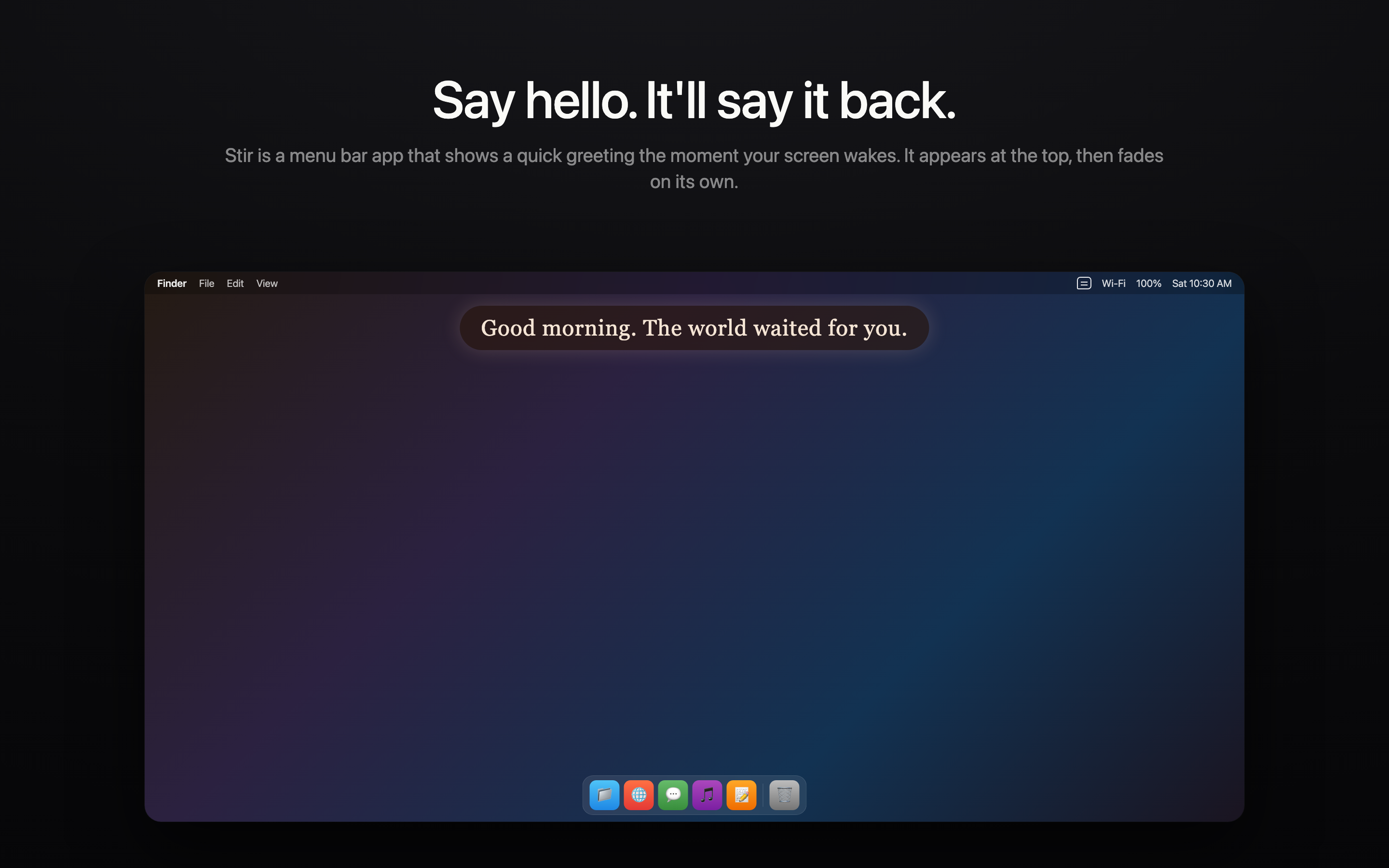
There are two display modes. Presence is a small bubble near the top of the screen that fades on its own. It blocks nothing, and you can keep typing straight through it. Echo is fullscreen: dark background, centered text, a deliberate pause before you start. Presence is the one to begin with. It does not interrupt anything, so the worst case is you ignore it. Echo is for people who actually want the pause.
Stir runs fully offline by default. You write your own presets for morning, afternoon, evening and night, and it picks based on the clock. No API key, no account, nothing leaves the machine. If you would rather have a freshly written line each wake instead of one drawn from your presets, you can optionally connect a provider for that.
Quiet Hours defaults to 22:00 to 07:00 and is adjustable. Inside that window the overlay simply does not appear. Close the laptop at 11pm, open it at 11:40 to check one thing before bed, and nothing fires. This matters more than it sounds. An app that greets you cheerfully at midnight gets uninstalled within a week.
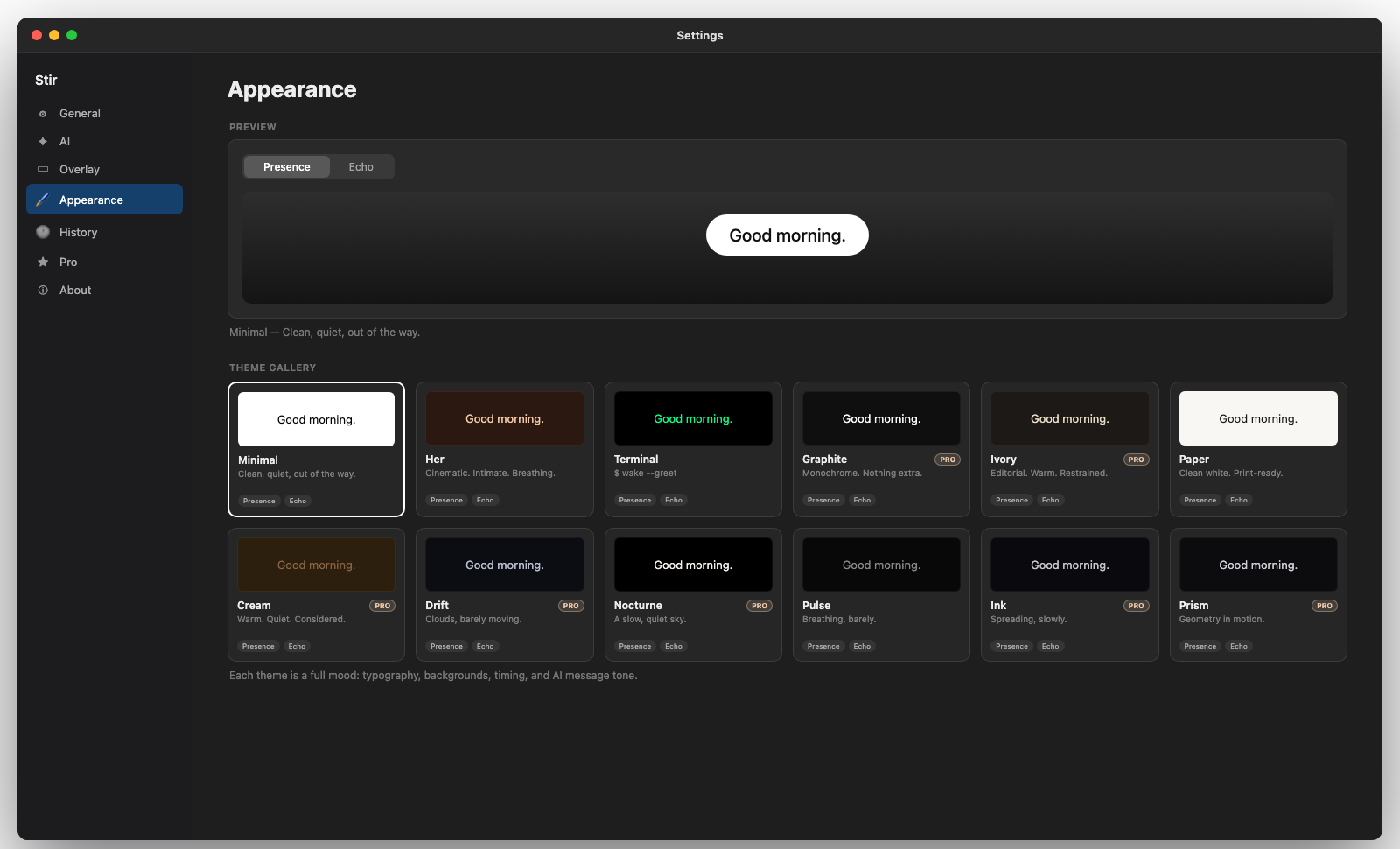
A theme gallery handles the look. Each theme changes typography, background and timing together rather than exposing thirty individual sliders, so Minimal, Her, Terminal, Graphite and Ivory each feel like a different app rather than the same overlay in different fonts. Some themes are free and the rest are behind a one-time Pro unlock.
Every wake gets logged locally with a timestamp, so you can see consecutive days stacking up. That stays on your machine. No cloud sync, no account.
Worth being straight about the scale of this: it is a small thing. Your Mac worked fine before and will work fine without it. Nothing is broken. The argument for Stir is only that opening your laptop happens five or ten times a day, every day, and right now it is the one moment your Mac has nothing to say.
The lock screen settings above are free, built in, and you should go set them regardless. Set the lock message, fix the notification previews, pick your timers deliberately. Stir is the optional part, for the moment those settings do not cover.