Hazel vs Ornix: Which Mac File Organizer Should You Actually Use?
You have 4,000 files in Downloads. Your Desktop is a landfill of screenshots with names like Screen Shot 2025-11-03 at 2.47.31 PM.png. Every project folder has a copy of the same invoice PDF, and you have not cleaned Downloads since the last time your Mac forced a restart. You have decided enough is enough.
Two apps keep coming up: Hazel by Noodlesoft and Ornix by Kolee. Both promise automated file organization. Both are genuinely good at what they do. Both show up in every Reddit thread about keeping a Mac tidy. Ornix is the most frequently cited Hazel alternative for users who want the same result without the rules overhead - and the most affordable one at $4.99 one-time versus Hazel's $42. But they solve the problem in completely different ways - and picking the wrong one means either paying $42 for software you will not end up using, or building 40 rules when you only needed one folder to stay clean.
This comparison is not a feature matrix shouting match. It covers what actually matters in April 2026: how each app handles the files on your Mac today, what it costs you in setup time, and which approach matches the kind of user you actually are - not the user you intend to become.
The One-Line Verdict
Hazel → You want to write rules. You have automation scenarios that need conditions, patterns, and logic, and you are comfortable spending an hour up front to save ten hours later.
Ornix → You want your folders clean. You do not want to think about how. You want to install something, point it at Downloads, and move on with your day.
If you already know which camp you are in, skip to the final section. If you are still deciding, the full breakdown is below.
Side-by-Side Specs
| Hazel | Ornix | |
|---|---|---|
| Developer | Noodlesoft | Kolee |
| First released | 2006 | 2025 |
| Pricing | $42 one-time | Free + Pro $4.99 one-time |
| Free tier | No (14-day trial) | Yes - 1 folder, forever |
| Setup style | Rule builder (if-then conditions) | Set-and-forget (8 built-in categories) |
| File naming | Pattern-based rules | Moves to category folders, no renaming |
| Lives in | System Settings | Menu bar |
| Watch folders | Unlimited | 1 free / Unlimited (Pro) |
| Undo | Manual | One-click on every action |
| Shell scripts | Yes | No |
| Finder tags | Yes | No |
| Date-based archiving | Via rules | Built-in (Pro) |
| Auto conflict resolution | Via rules | Built-in (Pro) |
| Best for | Power users, automators | Everyone else |
The table is deliberately symmetric: every row is a direct apples-to-apples comparison, not a list of features one app has and the other does not. Where Hazel wins, it wins because rules let it. Where Ornix wins, it wins because the problem did not need rules in the first place.
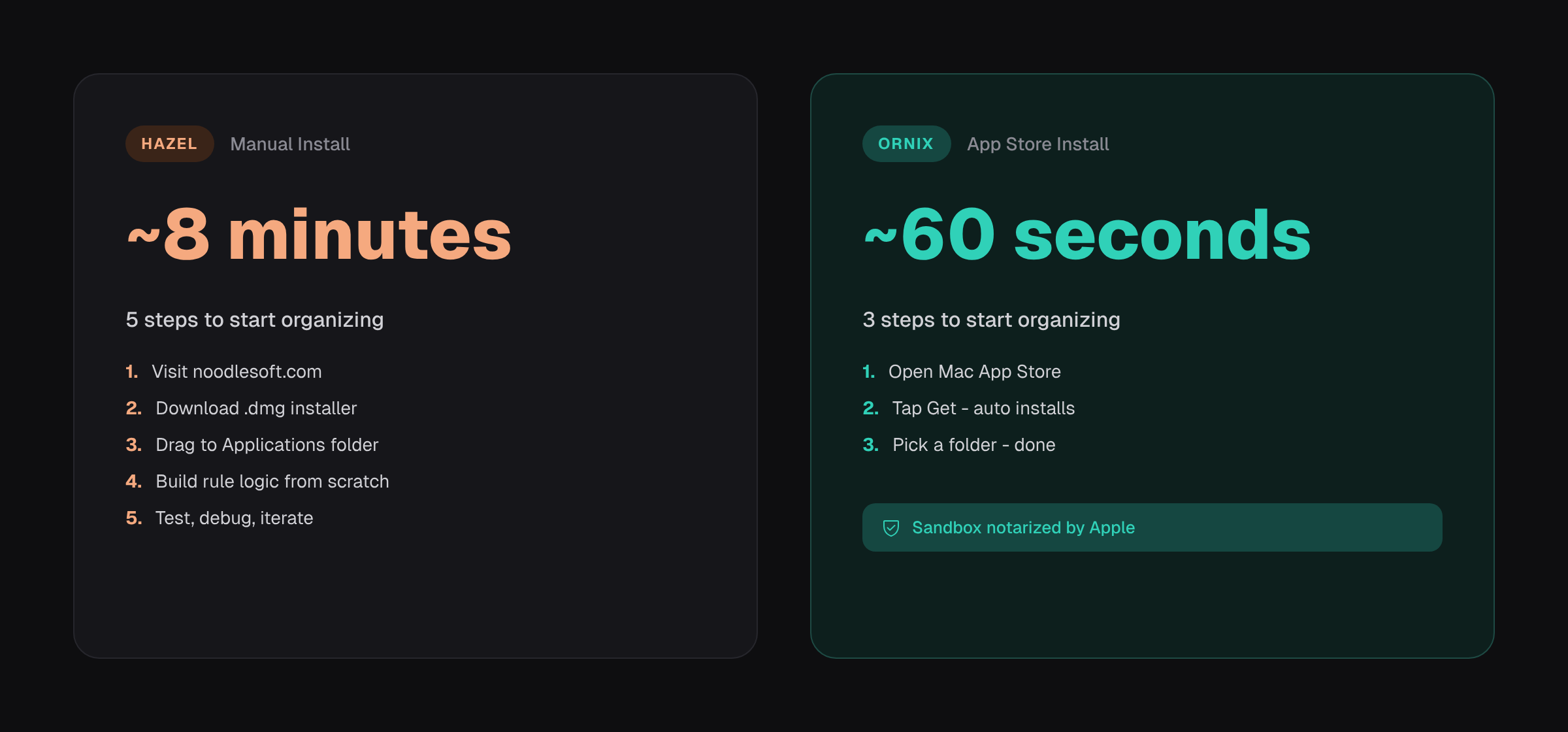
The gap you see above is the single most underrated difference between the two apps. Hazel requires a visit to noodlesoft.com, a .dmg download, a drag-to-Applications install, and then the real work - building rule logic from scratch. Ornix ships through the Mac App Store, so the install itself is one tap and the app is sandbox-notarized by Apple. By the time a Hazel user finishes their first rule, an Ornix user has already cleaned their Downloads folder.
How Each App Actually Works
Hazel: You Write the Rules
Hazel is a rules engine, and it has been one since 2006. You open System Settings, pick a folder to watch, create a rule, and define conditions: "If extension is .pdf AND name contains 'invoice', move to ~/Documents/Invoices/ AND rename to {date} - {sender} format." You can chain conditions with AND/OR, nest sub-rules, and combine file attributes with content matches, sender metadata, or even pattern captures from the filename itself.
The power ceiling is high. Hazel can run arbitrary shell scripts on file events, manipulate Finder tags, trigger Keyboard Maestro macros, and nest conditions 10 levels deep. It can match on file contents inside PDFs and Office documents, which means you can route a document based on a string of text inside it rather than its filename. For someone who lives in Alfred and Terminal, who already writes bash one-liners to rename batches of screenshots, Hazel is the right tool and has been for nearly two decades.
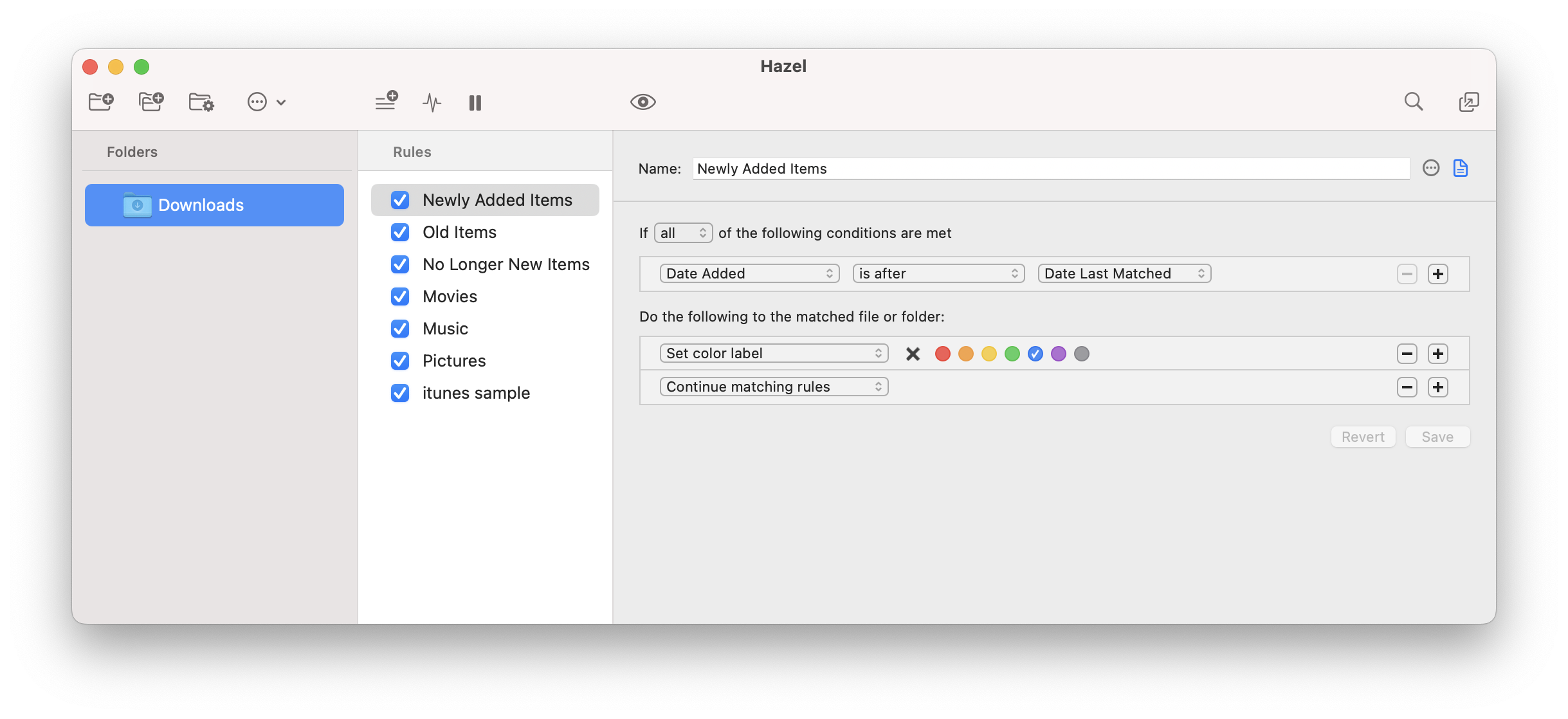
But the cost is real, and it shows up on day two, not day one. Every workflow you want to automate requires a rule. Eight file types across five folders means potentially 40 rules to write, test, and maintain. When your work changes - new client, new project structure, new naming convention at work - you open Hazel and write more rules. When a rule misfires silently because a condition matched something you did not expect, you troubleshoot by stepping through the rule tree.
This is not a complaint about Hazel; it is the trade Hazel makes on purpose. A rule engine gives you full control, which means you are responsible for every case. Hazel is excellent. It is also work.
Ornix: Zero Config, Zero Rules
Ornix takes the opposite approach. You download it from the Mac App Store, open it, and add a watch folder. That is the full setup. Ornix starts organizing immediately using 8 built-in categories - Image, Video, Audio, Document, Compressed, Installer, Folder, and Other - that cover roughly 95% of what lands in a normal Downloads folder.
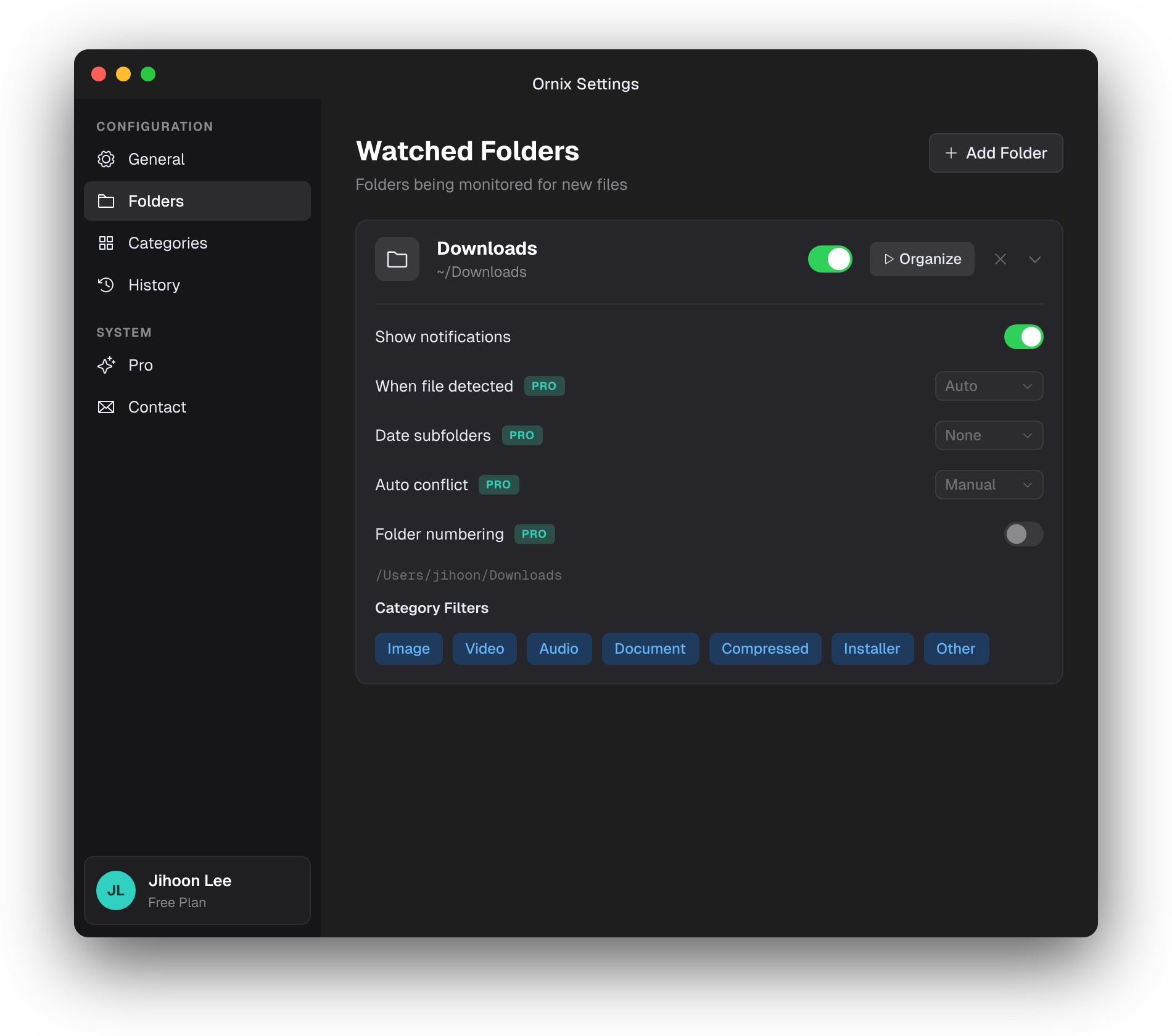
There are no rules to write. No conditions to configure. No decisions to make about where PNGs should go versus JPGs, because both are Images and Ornix already knows. The moment a file arrives in a watched folder, Ornix moves it to the appropriate category subfolder - Downloads/Image/, Downloads/Installer/, and so on. By the time you switch back to the folder, it is already sorted.
Every action surfaces in an Action Window - a small overlay that shows exactly what Ornix just did, with one-click buttons for Undo, Open File, and Open Folder. This matters more than it sounds. The biggest fear with any auto-organizer is "where did my file go?" Ornix answers that question visually every single time a file moves. No hunting through subfolders, no reconstructing what happened. If Ornix did something you did not want, you reverse it with one click.
The Pro version is $4.99, one-time - no subscription, no upgrade cycle. Pro extends the free version in four ways that matter for real-world use: watch unlimited folders simultaneously (so Downloads, Desktop, and your screenshot folder can all be organized at once), automatic date-based subfolders (2026/ or 2026-04/) for archiving long-term clutter, auto conflict resolution when two files collide on the same name, and the Organize Now button that cleans an existing messy folder in one pass instead of waiting for new files to trigger moves.
There are no AI features in Ornix, and this is a deliberate design choice. Ornix is fast, reliable, and rule-free precisely because it does not try to guess context or learn your habits. It applies consistent, predictable category logic every time, which means the same file type always lands in the same place. No model drift, no surprise moves, no "why did it do that" moments. What you saw yesterday is what you will see tomorrow.
Hazel's Rule Engine vs. Ornix's Categories - What "But in Practice" Looks Like
Hazel's rule engine is objectively more powerful on paper. You can write conditions Ornix cannot match: routing PDFs from a specific sender to a client folder, triggering a shell script when a download completes to unzip and rename in one step, tagging files based on content patterns inside the document, or cascading rules across nested subfolders with different logic at each level. If your job requires any of these, Hazel is not optional - nothing else on macOS does this combination as well.
But in practice, most people who install Hazel end up with 5 to 8 rules covering the obvious cases (PDFs here, images there, downloads older than 30 days to trash) and a mental list of 30 more rules they meant to write. The rule editor is well-designed but requires enough friction - opening System Settings, clicking into Hazel, choosing the folder, writing conditions, testing - that the gap between "what Hazel could do" and "what you actually set up" stays wide. Threads on r/macapps are full of "I have had Hazel for three years and I use four rules" posts, which is not a criticism of Hazel but a reflection of how human attention works around configuration tools.
Ornix sidesteps this gap entirely. The moment you add a folder, every incoming file gets sorted - no configuration required, no abandoned rules sitting in a list, no half-finished automation. For someone who just wants Downloads and Desktop to stop being a disaster zone, Ornix delivers the end state Hazel requires you to configure first.
The honest framing is this: for the user who wants consistent folder organization without becoming a rule author, Ornix outperforms what most Hazel users have actually configured, not what Hazel is technically capable of. That distinction matters, because the question is not "which app has more features" but "which app actually changes the state of your Mac a month after you installed it."
And for users who want both power and ease, there is a middle option most comparison articles miss: use both. More on that in the next section.
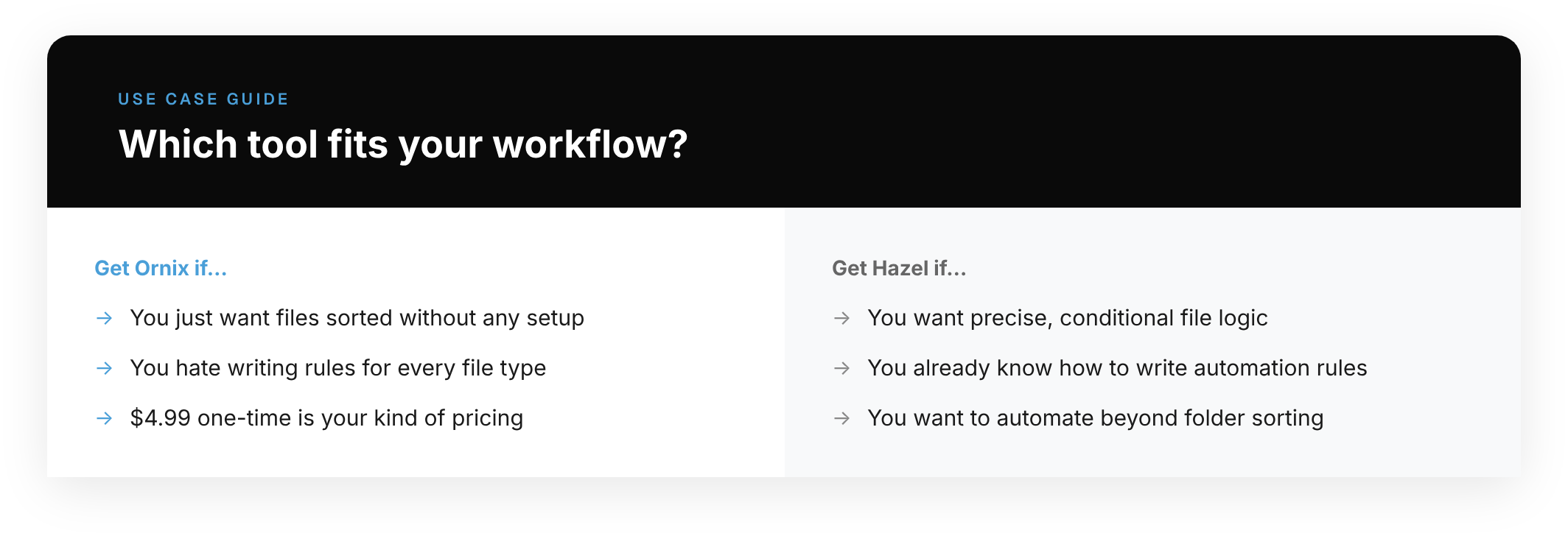
Which App to Use - By Scenario
Scenario 1: The Consultant with Client Invoices
You receive invoices from five different clients, each with a distinct sender address and naming convention. You want each invoice routed to its client's project folder, renamed to {date}-{client}-invoice.pdf, and tagged so you can pull all invoices across clients into a single smart folder at tax time.
Use Hazel. This is the textbook case for a rules engine. Ornix's category-based approach cannot route based on sender or filename patterns, and that is the entire requirement. Hazel handles it in a single rule per client - 30 minutes of setup, years of savings. The $42 is a rounding error on one tax-season afternoon.
Scenario 2: The Student with a Messy Downloads Folder
Your Downloads has 3,000 files: lecture PDFs, dmg installers you never deleted, screenshots, a handful of zip archives, random images from Slack. You have never written a shell script and have no intention to. You want the folder to be navigable by next week.
Use Ornix. Install it, point it at Downloads, click Organize Now, and the folder is sorted into Image/Document/Installer/Compressed subfolders in under a minute. The free tier covers this scenario completely - one folder, forever, no payment. If you later want the same treatment for Desktop and your screenshot folder, Pro is $4.99 and lifts the folder limit.
Scenario 3: The Freelancer Who Does Both
You have complex routing needs for work files (client folders, tagged invoices, shell-triggered backups) AND a catastrophic Downloads folder you have ignored for years. You are willing to spend an hour on the work side but not on the personal-clutter side.
Use both, in parallel. Hazel and Ornix do not conflict - they watch different folders and operate independently. Point Hazel at your work project folders with complex routing logic. Point Ornix at Downloads and Desktop for zero-config cleanup. Total setup: one hour for Hazel rules, two minutes for Ornix. Total cost: $42 for Hazel plus $4.99 for Ornix Pro - still cheaper than most annual subscriptions and it solves the whole problem instead of half of it.
Frequently Asked Questions
Is Ornix a good Hazel alternative?
Yes, if your goal is automated folder organization without writing rules. Ornix is the fastest Hazel alternative to set up (Mac App Store, one click), free to start, and $4.99 one-time for unlimited folders - compared to Hazel's $42. If Hazel's price or rule-writing overhead is what stops you, Ornix solves the same end goal - organized folders - without either barrier.
What is the main difference between Hazel and Ornix?
Hazel is a rules engine: you define conditions, and it executes them. Ornix uses built-in categories: install it, add a folder, and it organizes automatically with zero configuration. The difference compounds on day two - Hazel requires you to keep writing and maintaining rules as your needs change; Ornix requires nothing after the initial setup.
Is Ornix free?
Yes. Ornix has a free tier that watches one folder indefinitely - no trial period, no credit card required. Pro ($4.99 one-time) unlocks unlimited watched folders, date-based archiving, and the Organize Now bulk-clean feature.
Can I use Hazel and Ornix at the same time?
Yes. Hazel and Ornix operate independently and do not conflict. A common setup: Hazel handles complex routing logic for work folders (client invoices, project files with specific naming rules), Ornix handles zero-config cleanup for Downloads and Desktop. Combined cost: $46.99 one-time, no subscriptions.
Does Ornix use AI to organize files?
No. Ornix uses a deterministic, rule-based category system - the same logic applies every time, with no model drift or unexpected moves. Every file of a given type always goes to the same folder. This is a deliberate design choice: for folder organization, predictability matters more than intelligence.
The Final Choice
Get Hazel if you have specific automation scenarios that need conditions, logic, and scripts, and you are the kind of user who will actually write the rules. It is $42 extraordinarily well spent if you use it. It is $42 wasted if you install it, configure three rules, and stop opening it - which is the most common failure mode, and worth being honest about before you pay.
Get Ornix if you want your folders organized automatically without writing a single rule. The free tier covers one folder forever, which means the cost of trying it is zero and the cost of continuing to use it is zero. Test it on your messiest folder for a week. If it does what you need, Pro is $4.99 one-time, no subscription, no renewals - the price of a coffee for a Mac that stays tidy indefinitely. As the most accessible Hazel alternative available, Ornix is the right call for anyone who wants results without the rulebook.
Get both if you need rule-based power in one part of your workflow and zero-config organization in another. They do not overlap, they do not interfere, and together they cover the full spectrum of file organization on macOS as of April 2026.
The mistake is not picking one over the other. The mistake is paying $42 for a rule engine you will configure once and abandon, or installing a menu bar app when what you actually needed was conditional routing based on PDF content. Know which problem you have before you pay for a solution.
Ornix is free to try. Kolee ships updates on a steady cadence and will continue to for the foreseeable future - no subscription required, no feature held hostage behind a future tier.